The short answer
Yes, ChatGPT can make a t-shirt design. Describe the idea, or add a photo, and it draws finished-looking artwork in almost any style: line art, a vintage poster, a cartoon mascot, varsity lettering. You can ask for changes in the same chat, like “make the fox bigger” or “try it in two colours.”
What it doesn’t make is the shirt, or the file a printer needs. A picture that looks great on screen can print soft, with a box around it, a misspelled word, or colours that go dull on cotton. Each of those has a quick fix once you know to look for it.
Prompts that work for shirts
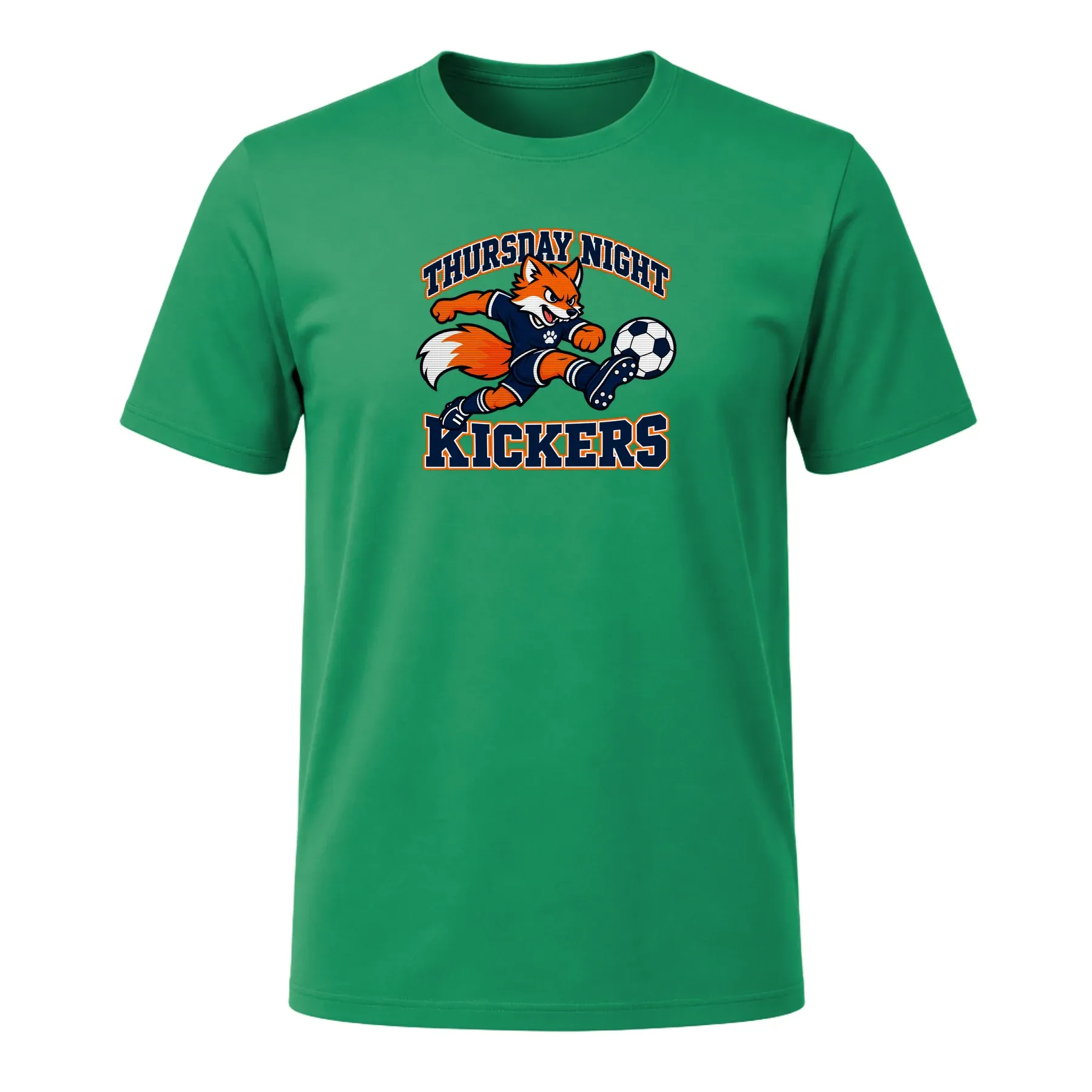
A good shirt prompt says what the shirt is for, the subject, the style, the exact words in quotes, how many colours, and the shirt colour. And it asks for the artwork alone, so you don’t get a picture of a shirt. For example:
A t-shirt graphic for our Thursday night rec soccer team: a fox kicking a soccer ball, with “Thursday Night Kickers” in big varsity letters. Bold outlines, three flat colours that read on a kelly green shirt. Artwork only, centred, not on a shirt, on a plain background.
Words and lettering
- T-shirt artwork only, not on a shirt: “Lake Week 2026” in chunky 1970s rounded letters over three sunset stripes. Orange, mustard and cream, for a forest green shirt. Plain background.
- T-shirt artwork only: “Head of Snacks” in a vintage athletic arch with a small cookie underneath. One colour, white, for a navy shirt. Plain background.
Mascots and logos
- A team mascot for a t-shirt: a pelican spiking a volleyball, bold black outlines, three flat colours, with “Tuesday Night Spikers” in a heavy arched type above. Artwork only, centred, plain background.
- A simple round badge for a bakery called “Crumb & Co.”: a rolling pin and wheat, two colours, clean lines that still read at 4 inches wide. Artwork only, plain background.
- A lightning bolt made of circuit lines with “Hack Week 2026” underneath, for the back of a royal blue shirt. Two colours, white and yellow. Artwork only, plain background.
From a photo
- Draw the dog in this photo as a cartoon pilot in a little red plane, in the style of a vintage travel poster. Artwork only, plain background.
- Turn this photo of my grandparents into simple line art inside a laurel crest, with “Okafor Family Reunion 2026” below. One colour, dark brown, for a cream shirt.
For a group or an event
- A family reunion crest: an oak tree with deep roots, “Mensah Family Reunion 2026” around it, two colours for a brown shirt. Artwork only, plain background.
- A small left-chest logo for a bike shop’s staff shirts: a gear and a spoke wheel inside a crest, “Spoke & Sprocket”, one colour. Artwork only, plain background.
- For the back of a group shirt: a list of eight first names in a neat condensed type under “Maya’s Last Splash”, white on a teal shirt. Artwork only, plain background.
What trips people up when printing
It drew a shirt, not the artwork
Ask for “a t-shirt design” and you may get a photo of a shirt with the design on it. Printing that puts a picture of a shirt on your shirt. Ask for “artwork only, not on a shirt”.
The background isn’t really transparent
A design on a white or coloured square prints as a square. Ask for a transparent background and you may get one, or you may get a grey-and-white checkerboard painted into the picture. Check the downloaded file, not the preview in the chat: open it on a dark background. If the checkerboard is painted in, ask for a plain solid background instead, remove that with a background-removal tool, and check again. Soft glows and faded edges are worth avoiding too: semi-transparent pixels can print as a muddy halo.
The file is too small for the print
Printers want about 150 pixels per inch at the size the design prints. A design 12 inches wide needs about 1,800 pixels across; a 4-inch chest logo needs about 600. Check your file’s size in pixels (Get Info on a Mac, Properties on Windows). If it’s short, use an AI upscaler before you send it, or print it smaller.
The words come out wrong
Image models are much better at lettering than they were, but they still swap, drop or invent letters, especially in names, dates and small text. Read every word letter by letter. If one is wrong, ask ChatGPT to fix only that word and keep everything else the same, and check the whole design again.
Colours look different on fabric
A screen glows; cotton soaks up ink. Neon and very bright colours print duller, and pale pastels can disappear on a white shirt. On dark shirts, printers lay down white first, and very thin lines or tiny text can fill in or vanish. Bold shapes, solid colours and a design made for the shirt colour print best, so name the shirt colour in your prompt.
Size and placement
Decide where it goes before you order: a small logo on the left chest, a big design across the front, or both. Our largest print on each side is 12 × 16 inches. Decide how wide you want it in inches, not just “big”.
A front and a back
ChatGPT gives you one image at a time. For a back print, make it as its own image in the same style and colours (“now the back of the same shirt: our names in a list”), so you have one file for each side.
How to get a ChatGPT design printed, step by step
- Ask for the artwork only, on a plain background, in the colours you want on the shirt.
- Check every word, letter by letter.
- Download the image and check its size: about 150 pixels for every inch it will print. Upscale it if it’s short.
- Remove the background, then open the file on a dark background to make sure it’s really gone.
- Decide where it goes and how wide, and whether there’s a back.
- Add the image to the design box at the top of this page and say what you want done with it. Check it on the shirt colour, front and back, before you order.
- For a group, set a quantity for each size and check out once, or share the design’s link so everyone orders their own.
Or describe it to our designer
Our AI t-shirt designer takes care of most of these steps. Describe the shirt the way you’d describe it to ChatGPT, or add the image you made there, and it draws artwork made for a shirt and shows it on the shirt colour. If the art has a background, one switch removes it. Ask for changes in plain words, and read the words on the shirt before you order. When you order, we build the print file at the full print size and upscale the art if it’s too small.
- Front and back. Ask for a back and see both sides before you order. A back print adds +$6 a shirt.
- A group in one order. Set a quantity for each size from XS–5XL and check out once, or share the design’s link and let everyone order their own.
- No minimum. From $20 a shirt, and one shirt is fine. Here’s what a custom shirt costs, shipping and tax included.
Starting from a picture of someone? See a custom shirt from a photo. Shirts for a crowd: employee shirts, family reunion shirts and group trip shirts.
ChatGPT is a trademark of OpenAI. Same Shirt Club is independent and isn’t affiliated with or endorsed by OpenAI.